How to Read a Connect Report
Every Connect report tells a story about how your website speaks to itself. Behind the data — pages crawled, mentions found, links made and missed — lies a complete picture of your internal ecosystem. Knowing how to read that picture properly is the difference between a network that breathes and one that blocks itself up.
This guide walks through each section of a Connect scan, explaining what the numbers mean, how to act on them, and how to use the findings to strengthen the structure, clarity, and long-term health of your website.
If you haven't already, you may wish to read our guide for how to use Lennon Tree Connect first

Setting up your scan
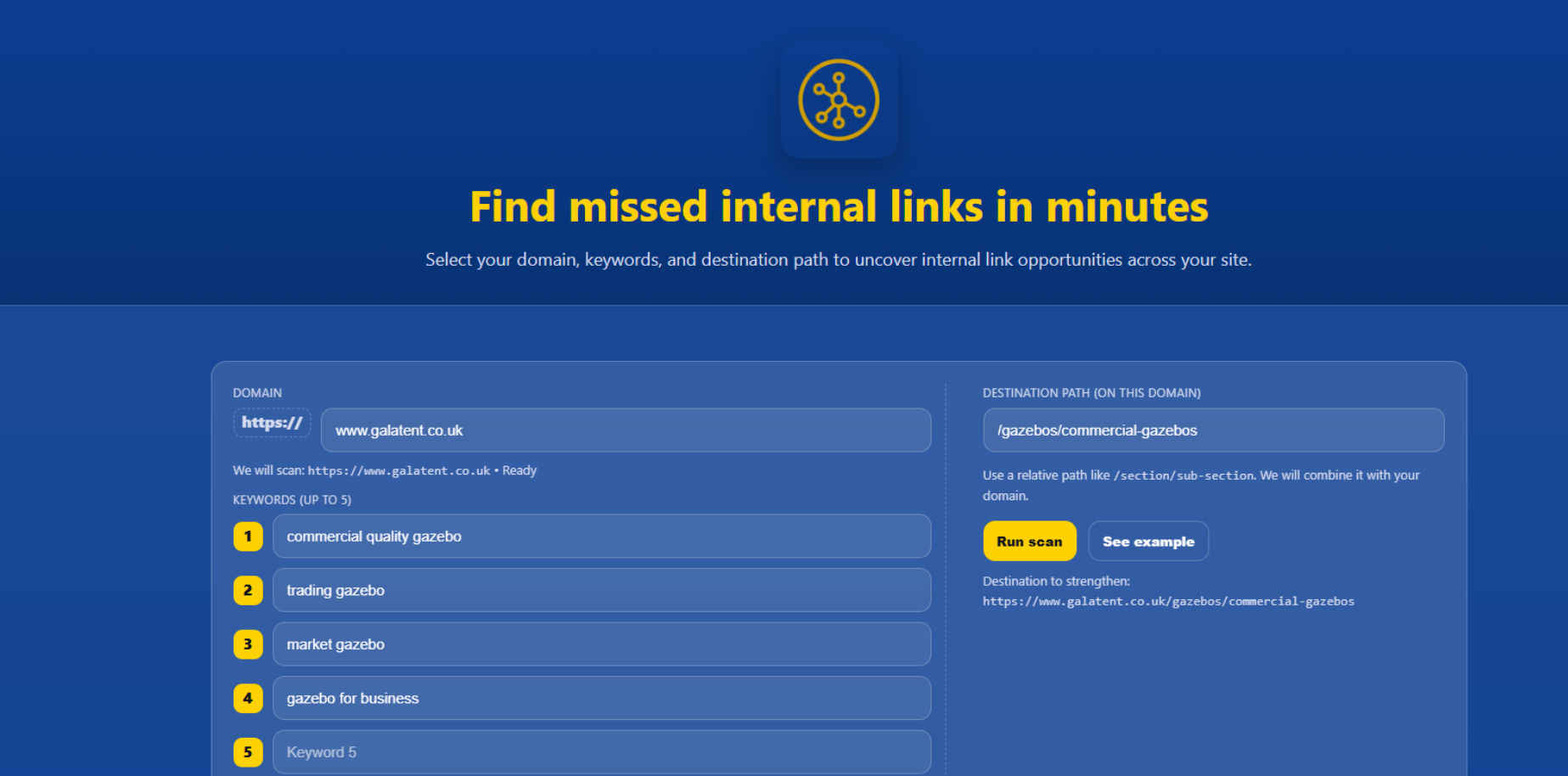
Before you can read a Connect report, you need to understand what you’ve asked it to find. The scan setup is simple:
-
Domain: Enter the main website you want to analyse — for example,
https://www.galatent.co.uk. -
Destination Path: Add the specific page you want to strengthen internally, like
/gazebos/commercial-gazebos. -
Keywords (up to 5): Type in the phrases that you’d naturally use as anchor text when linking to that destination. These might include commercial quality gazebo, market gazebo, or gazebo for business.
When you hit Run Scan, Connect crawls your chosen domain and searches for every instance of those keywords. It then reports where they already link to your destination (Linked) and where they don’t (Unlinked). The result is a live map of missed opportunities and anchor usage across your site
1) Reading the scan summary
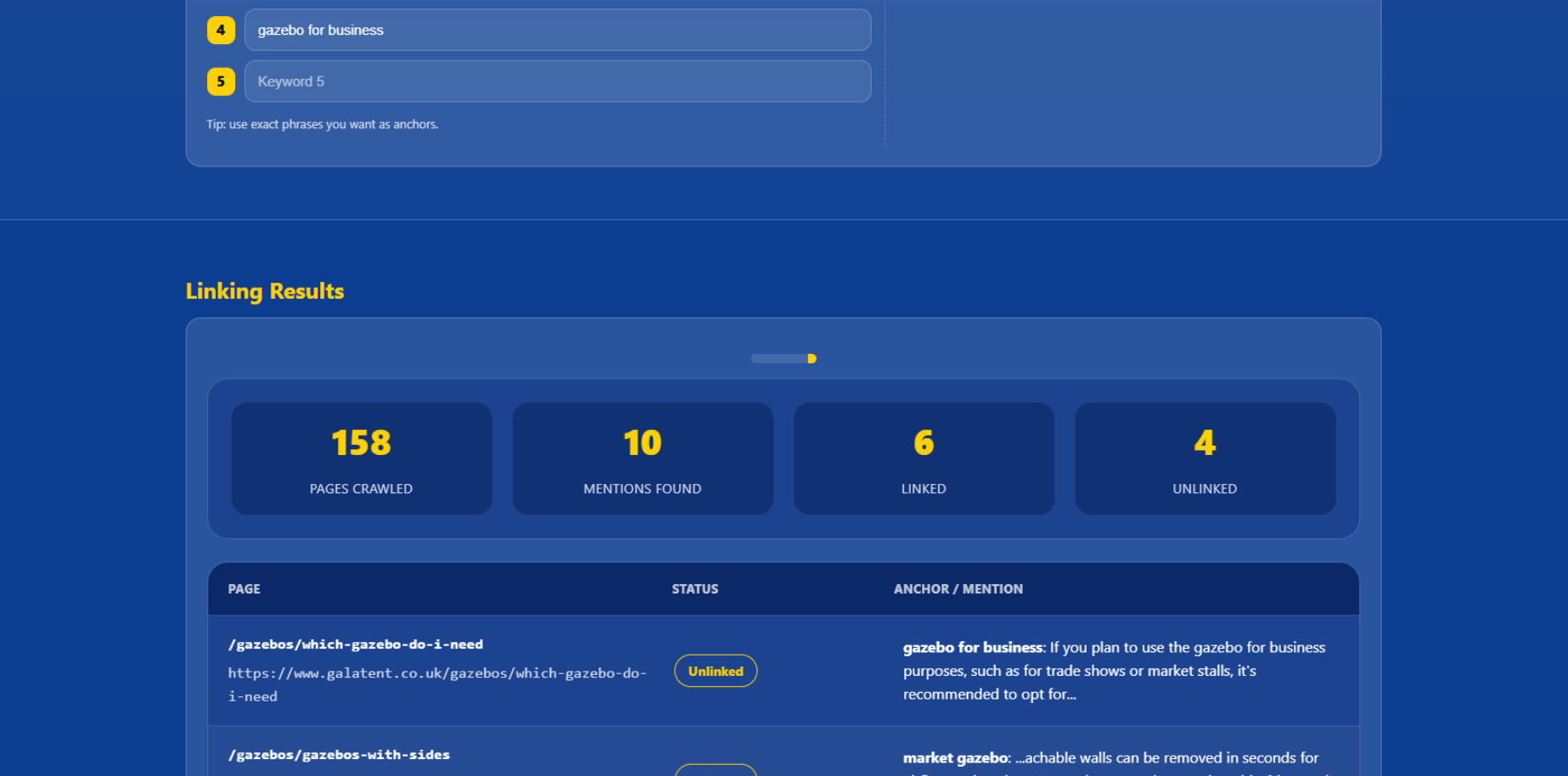
At the top of the results you’ll see four tiles:
-
Pages Crawled – scope of the scan.
-
Mentions Found – total keyword/phrase hits across the domain.
-
Linked – mentions already linking to your chosen destination.
-
Unlinked – mentions with no link (your opportunity list).
Use this for triage. If Mentions >> Linked, you’ve got immediate wins. If Linked is high but anchors look repetitive, move to variety fixes.
2) Unlinked Mentions (your to-do list)
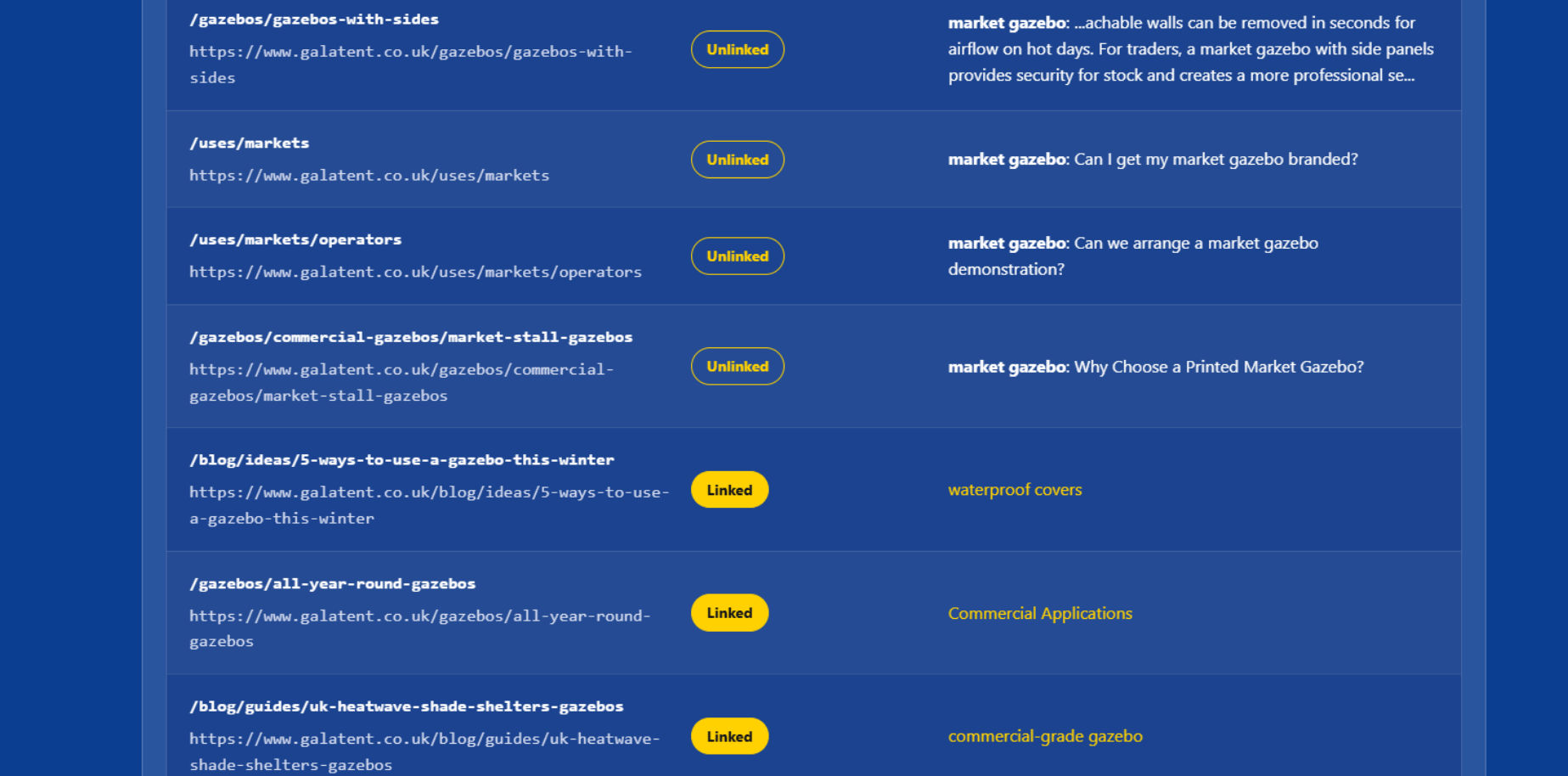
Each unlinked row shows:
-
Page path + full URL – where to add the link.
-
Status – “Unlinked”.
-
Context snippet – the exact sentence/paragraph with your keyword highlighted.
What to do
-
Add a contextual link to your destination page using a natural anchor in the snippet.
-
Prefer the first relevant mention on the page (don’t over-link).
-
If a page already links to that destination elsewhere, consider leaving this one unlinked unless it measurably improves the journey.
Prioritise
-
Pages already getting traffic.
-
Buying-intent or cornerstone content.
-
Guides that drive users deeper into the funnel.
3) Linked Mentions (the anchor audit)
These rows show:
-
Page path + URL – where an internal link already exists.
-
Status – “Linked”.
-
Anchor / Mention – the exact anchor text currently used.
What to check
-
Relevance – does the anchor actually describe the destination?
-
Variety – do you see the same phrase repeated across multiple pages?
-
Intent alignment – does the anchor promise what the destination delivers?
Your real example (good catch)
-
Anchor used: “waterproof gazebos”
-
Destination: /gazebos/commercial-gazebos
-
Action: adjust that anchor or the link. If the paragraph is about waterproofing, consider linking to a waterproof-focused page instead, or change the anchor to something aligned with “commercial gazebos” (e.g., commercial-grade gazebos, market-ready gazebos).
4) Anchor variety: what “good” looks like
Search engines and users both benefit when anchors vary naturally:
-
Exact match (e.g., commercial gazebos): use sparingly for clarity.
-
Partial match (e.g., commercial-grade gazebos): safe default for most links.
-
Contextual anchors (e.g., our buying guide for market traders): improves readability and looks organic.
-
Branded / navigational (e.g., Gala Tent range): helpful inside brand/overview pages.
Quick rule of thumb
-
No single anchor should dominate more than ~30–40% of links to a given URL.
-
Each page should avoid repeating the same anchor multiple times.
5) Deciding what to fix first (a simple checklist)
Tick through this per destination URL:
-
Are the unlinked mentions on high-value pages done first?
-
Do linked anchors read naturally and match destination intent?
-
Is there enough anchor diversity across the whole report?
-
Any misleading anchors pointing to the wrong place (like waterproof gazebos → /commercial-gazebos)?
-
Any pages with too many links added recently (thin content + dense links = noisy)?
6) Exporting & working the list
Use Export to create a working sheet for you or the team. Recommended columns:
-
Page URL
-
Anchor (current or proposed)
-
Status (Unlinked/Linked)
-
Action (Add / Edit / Leave)
-
Owner
-
Date completed
This turns the report into a living document you can clear over a few short sessions.
7) Aftercare: reciprocals & refresh
-
Where you’ve added new inbound links, open the destination page and add sensible return links back out to the most relevant referring pages.
-
When a batch is complete, re-run a scan for the same destination to confirm progress and catch new mentions that appeared while you were fixing the old ones.
Common patterns to watch
-
Great content, poor links: guides and blogs often mention key phrases but never link. Easy wins.
-
One anchor to rule them all: fix repetition across multiple pages to avoid over-optimisation.
-
Topic drift: anchors that promise one topic but point to another (your waterproof → commercial example). Align or reroute.
-
Orphans: pages that never receive links. Use relevant mentions elsewhere to pull them into the network.
Outcome
Read the summary, work unlinked first, audit anchors second, and clean up misalignments as you go. Small, steady passes beat one giant sprint. Connect gives you the map; your edits give the site balance.