How to Read a Connect Report
Every Connect report tells a story about how your website talks to itself. Behind the numbers, the pages crawled, the mentions found, the links made and missed, sits a full picture of your internal linking. Learning to read that picture is the difference between a site that flows and one that snarls up.
This guide walks through each section of a Connect scan: what the numbers mean, how to act on them, and how to use the findings to strengthen the structure, clarity and long-term health of your site.
If you haven't already, you may want to read our guide on how to use Lennon Tree Connect first.

Setting up your scan
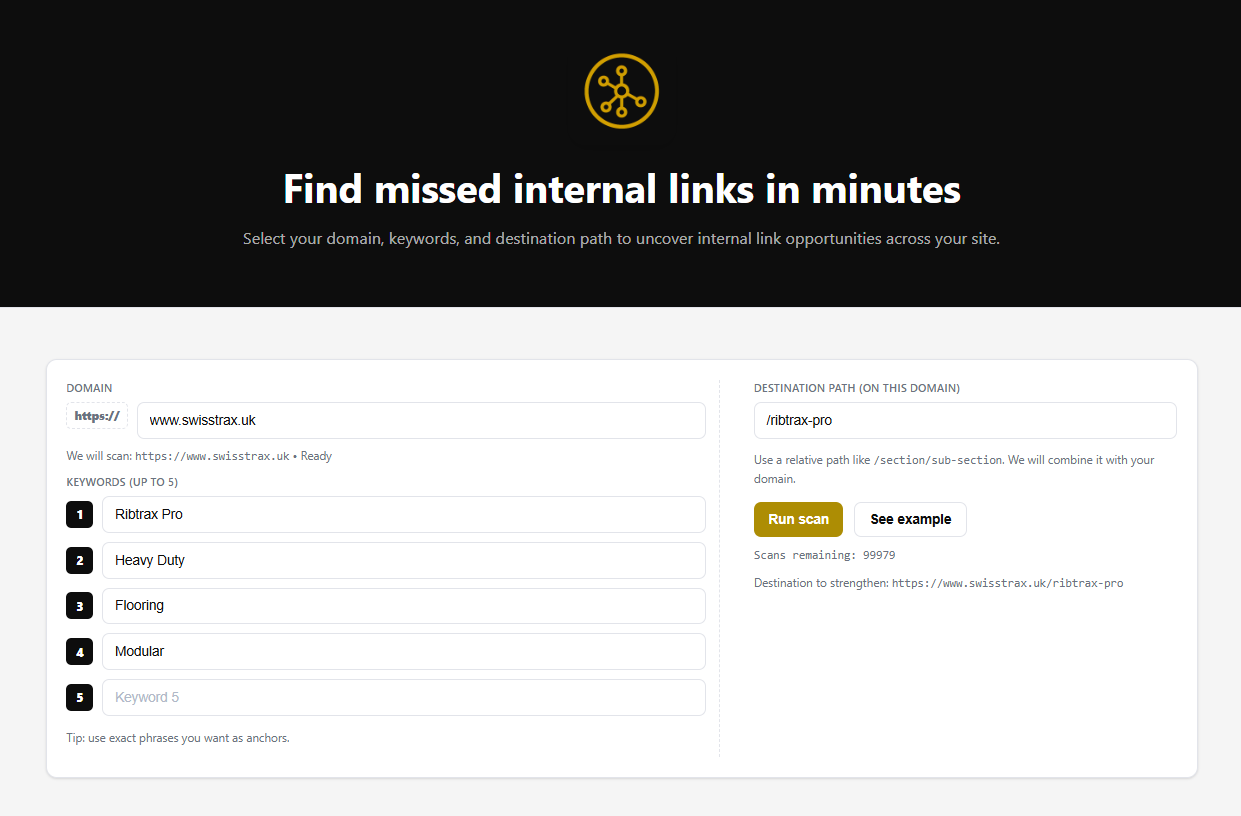
Before you can read a report, it helps to know what you asked Connect to find. The setup is short:
-
Domain: the site you want to analyse, for example https://www.swisstrax.uk.
-
Destination Path: Destination Path: the page you want to strengthen internally, entered as a relative path like /ribtrax-pro. Connect combines it with your domain, so this becomes https://www.swisstrax.uk/ribtrax-pro.
-
Keywords (up to 5): the phrases you would naturally use as anchor text when linking to that destination. For the Ribtrax Pro page that might be Ribtrax Pro, Heavy Duty, Flooring and Modular.
Tip: use the exact phrases you want as anchors. When you hit Run Scan, Connect crawls the domain and finds every instance of those keywords, then reports where they already link to your destination and where they don't. The result is a live map of missed links and anchor usage across the site.
1) Reading the scan summary
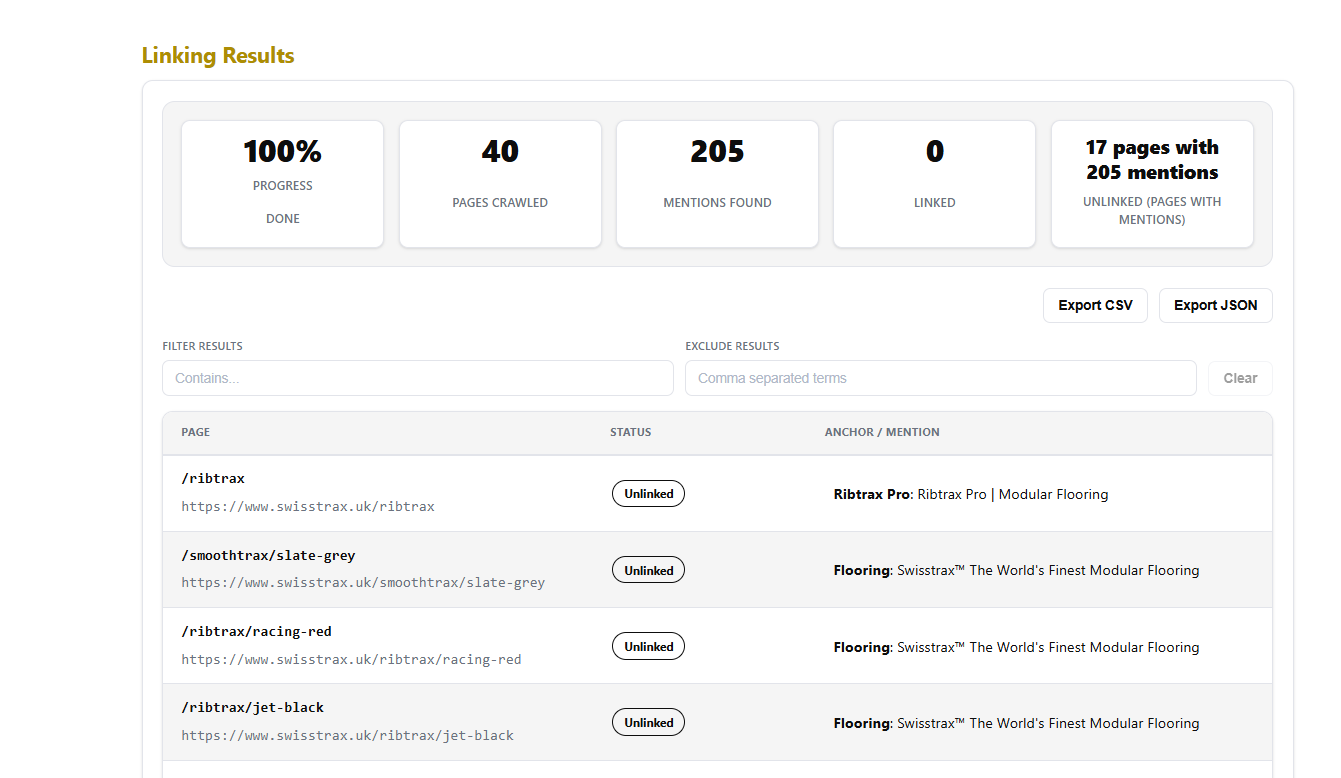
At the top of the results you get a row of summary tiles:
-
Progress: whether the scan has finished.
Pages Crawled: the scope of the scan. In this example, 40.
-
Mentions Found – total keyword hits across the domain. Here, 205.
-
Linked – mentions that already link to your destination.
-
Unlinked –the pages and mentions with no link yet, your opportunity list. This scan shows 17 pages with 205 mentions.
Use this for triage. When Mentions Found dwarfs Linked, you have immediate wins waiting. When plenty are linked but the anchors look repetitive, your job shifts to variety instead.
2) Unlinked Mentions (your to-do list)
Each unlinked row shows:
-
Page path + full URL – where to add the link.
-
Status – “Unlinked”.
-
Anchor / Mention – the exact phrase Connect matched, with context.
What to do
-
Add a contextual link to your destination page using a natural anchor in the snippet.
-
Prefer the first relevant mention on the page (don’t over-link).
-
If a page already links to that destination elsewhere, consider leaving this one unlinked unless it measurably improves the journey.
Prioritise
-
Pages already getting traffic.
-
Buying-intent or cornerstone content.
-
Guides that drive users deeper into the funnel.
3) Linked Mentions (the anchor audit)
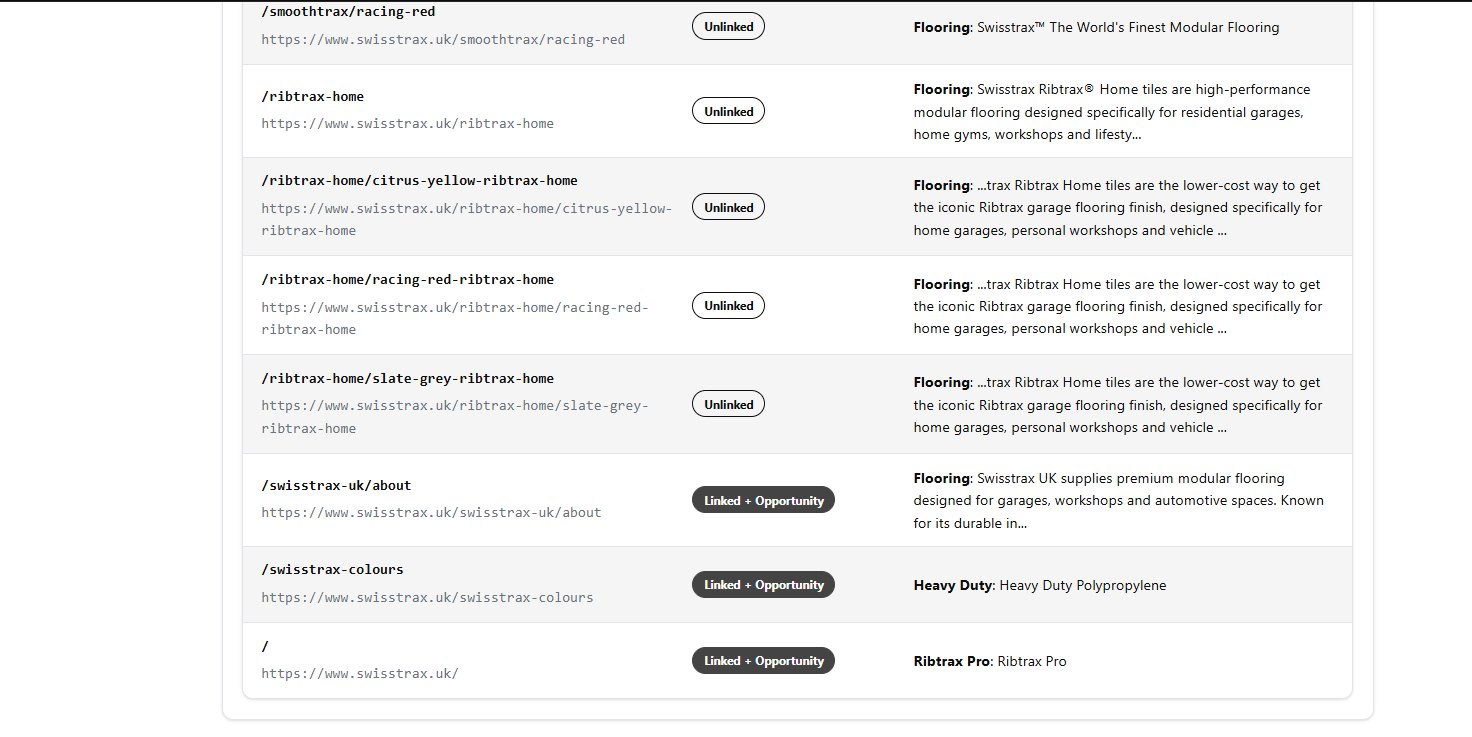
Some rows come back as Linked, or as Linked + Opportunity, where the page already links to your destination and Connect has found further mentions you could use. These rows are your audit list. Each shows:
-
Page path + URL – where an internal link already exists.
-
Status – “Linked”.
-
Anchor / Mention – the exact anchor text currently used.
What to check
-
Relevance – does the anchor actually describe the destination?
-
Variety – do you see the same phrase repeated across multiple pages?
-
Intent alignment – does the anchor promise what the destination delivers?
Your real example (good catch)
-
Anchor used: "Swisstrax The World's Finest Modular Flooring", on pages like /ribtrax/racing-red and /smoothtrax/slate-grey.
-
Destination: : /ribtrax-pro
-
Action: that phrase is a brand slogan, so linking the whole thing to /ribtrax-pro gives you an anchor that names the brand rather than the page it points at. Tighten it. Link a descriptive phrase the reader understands, like "Ribtrax Pro" or "modular flooring tiles", and lean on the pages where the product name itself appears as the anchor.
4) Anchor variety: what “good” looks like
Search engines and users both benefit when anchors vary naturally:
-
Exact match (for example, Ribtrax Pro): use sparingly, for clarity.
-
Partial match (for example, heavy-duty modular flooring): a safe default for most links.
-
Contextual anchors (for example, our heavy-duty garage flooring range): reads well and looks organic.
-
Branded / navigational (for example, the Swisstrax range): useful on brand and overview pages.
Quick rule of thumb
-
No single anchor should dominate more than ~30–40% of links to a given URL.
-
Each page should avoid repeating the same anchor multiple times.
5) Deciding what to fix first (a simple checklist)
Tick through this per destination URL:
-
Are the unlinked mentions on high-value pages done first?
-
Do linked anchors read naturally and match destination intent?
-
Is there enough anchor diversity across the whole report?
-
Any misleading anchors pointing at the wrong place, like a brand slogan dropped onto a specific product page?
-
Any pages with too many links added recently? Pointing at the wrong place, like a brand slogan dropped onto a specific product page?
6) Exporting & working the list
Use Export to create a working sheet for you or the team. Recommended columns:
-
Page URL
-
Anchor (current or proposed)
-
Status (Unlinked/Linked)
-
Action (Add / Edit / Leave)
-
Owner
-
Date completed
This turns the report into a living document you can clear over a few short sessions.
7) Aftercare: reciprocals & refresh
-
Where you’ve added new inbound links, open the destination page and add sensible return links back out to the most relevant referring pages.
-
When a batch is complete, re-run a scan for the same destination to confirm progress and catch new mentions that appeared while you were fixing the old ones.
Common patterns to watch
-
Great content, poor links: guides and blogs often mention key phrases but never link. Easy wins.
-
One anchor to rule them all: fix repetition across multiple pages to avoid over-optimisation.
-
Topic drift: anchors that promise one topic but point to another (your waterproof → commercial example). Align or reroute.
-
Orphans: pages that never receive links. Use relevant mentions elsewhere to pull them into the network.
Outcome
Read the summary, work the unlinked list first, audit your anchors second, and clean up the misalignments as you go. Small, steady passes beat one giant sprint. Connect gives you the map; your edits give the site its balance.